
Integrate Payment Gateway
Setup
In order to be able to accept payments through your own gateway, you need to follow these steps.
- Create a Gateway
- Get the secret of the gateway
- Integrate your Payment Gateway as described here
- Activate your Gateway
Overview
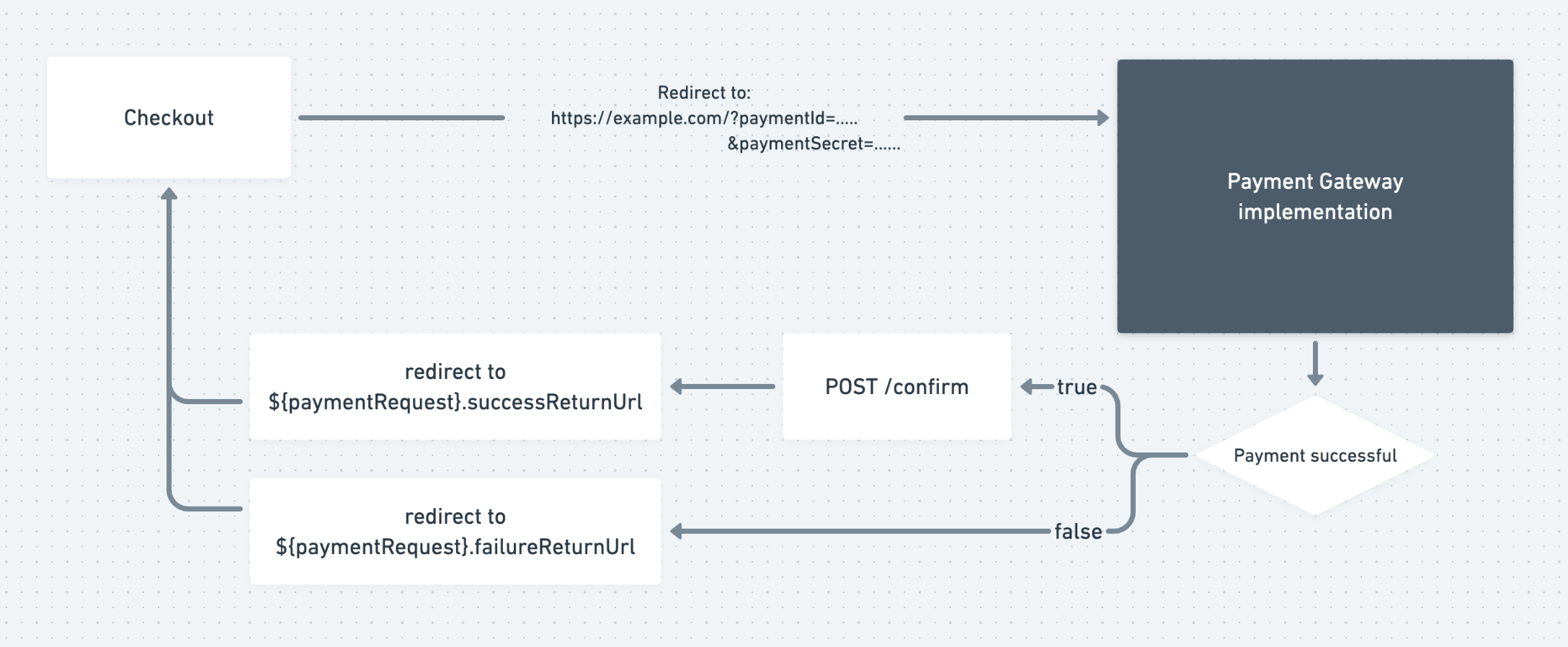
If you have an active payment gateway, the customer will see your gateway as a possible payment method during the checkout process. When the customer decides to proceed with this payment gateway he will be redirect to the URL which was defined during creation.
From there you are responsible to accept a payment, send a request to the vivenu API when the payment either fails or succeeds and to redirect the customer to according return URL.
If the customer already paid and the /confirm request fails please remember to refund the amount.
Example Payment Gateway
The following code demonstrates a very naive implementation of an external payment gateway.
const express = require('express');
const { nanoid } = require('nanoid');
const fetch = require("node-fetch");
const app = express();
const port = 7000;

const VIVENU_URL = "https://vivenu.dev";
const API_KEY = "key_";
const GATEWAY_SECRET = "pm_secret_";

const getPaymentRequest = async (paymentId) => {
    const response = await fetch(VIVENU_URL + "/api/payments/requests/" + paymentId, {
        method: "GET",
        headers: {
            "Content-Type": "application/json",
            Accept: "application/json",
            Authorization: "Bearer " + API_KEY
        },
    });

    const json = await response.json();
    return json;
};

const completePaymentRequest = async (paymentId) => {
    const response = await fetch(VIVENU_URL + "/api/payments/requests/" + paymentId + "/confirm", {
        method: "POST",
        headers: {
            "Content-Type": "application/json",
            Accept: "application/json",
            Authorization: "Bearer " + API_KEY
        },
        body: JSON.stringify({
            gatewaySecret: GATEWAY_SECRET,
            reference: nanoid(),
        })
    });

    const json = await response.json();
    return json;
};

app.get('/payment/gateway', async (req, res) => {
    const paymentId = req.query.paymentId;
    const paymentRequest = await getPaymentRequest(paymentId);

    console.log(paymentRequest);

    if (paymentRequest.status !== "NEW") {
        console.error("payment request is already processed");
        return res.status(403).end();
    }

    const completedPaymentRequest = await completePaymentRequest(paymentId);
    res.redirect(completedPaymentRequest.successReturnUrl);
    res.end();
});

app.listen(port, () => {
    console.log(`Listening at http://localhost:${port}`)
});
Refunds
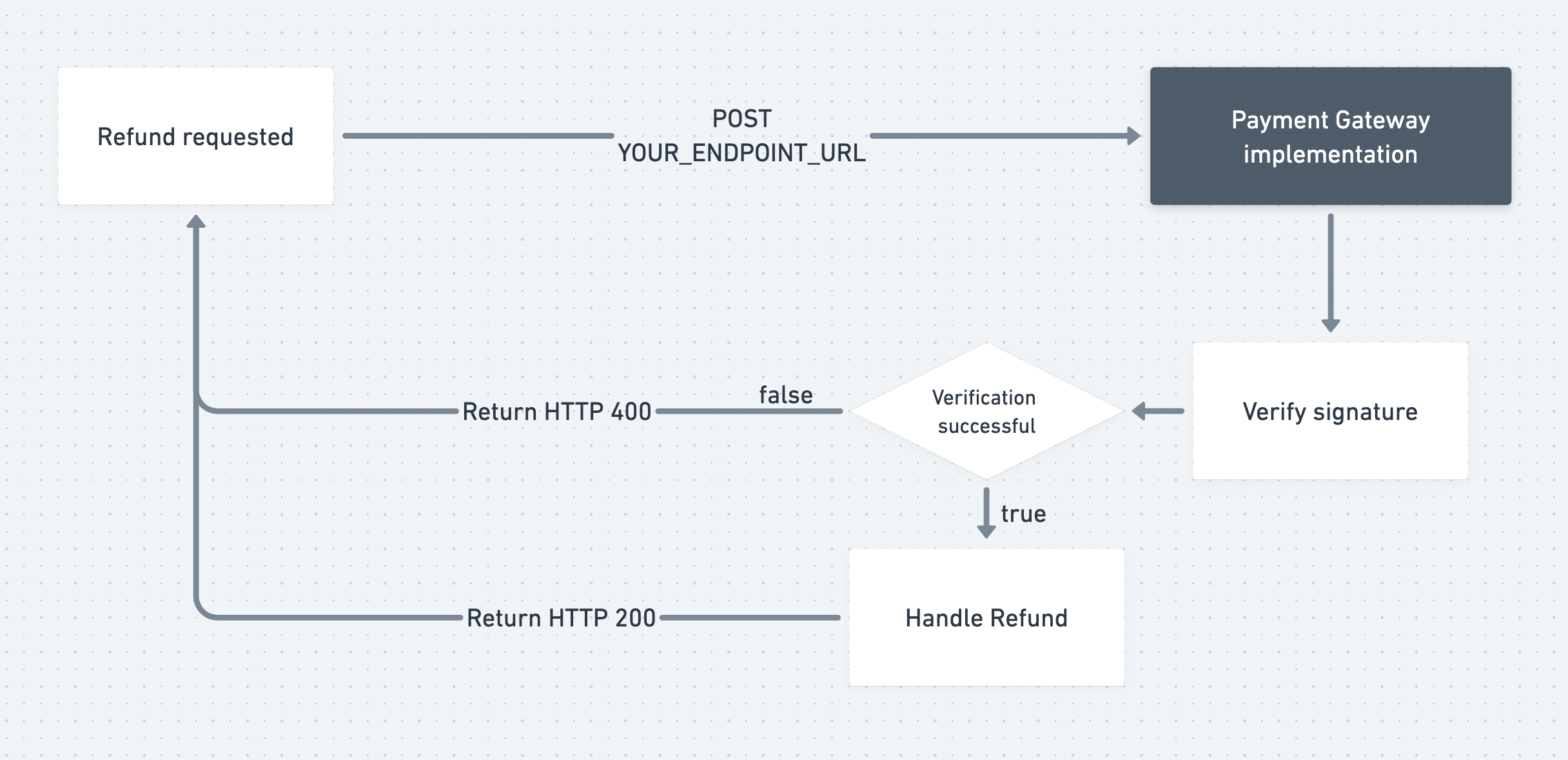
In order to accept refunds through you custom payment gateway you need to expose a POST route and set it up in the payment gateway.
Whenever a refund is requested we will POST to your endpoint and send a refund request.
We will add a x-vivenu-signature header in order to enable you to verify that the request is authentic and signed with your gateway secret.
We strongly recommend to verify the signature in order to prevent malicious users to send refund requests.
Caution: In case of partial refunds the amount can be lower than the initial amount of the payment.
The refund request
Attributes
A unique ID for the request
An ISO timestamp of the request. Can be used to prevent old requests from being processed
Server mode of the API
devprodThe type of the action
payment.refundThe ID of the transaction to refund
The ID of the seller
The reference of the payment
The amount to refund
An ISO 4217 3-character code of the currency
EURUSDGBPAUDCHFTHBILSCOPMXNDKKNOKSEKQARCADISKGTQINRDOPSGDPLNSARTTDZARKYDHKDCZKKRWJPYNZDAEDMADTWDBRLBWPNADKESSCRTRYSZLLSLTZSUGXZMWZWGGHSNGNSLELRDXOFXAFGELIDRARSCRCHUFEGPMYRVNDPHPMWK{"id": "string","time": "2030-01-23T23:00:00.123Z","mode": "dev","type": "payment.refund","data": {"transactionId": "string","sellerId": "string","psp": "string","amount": 19.15,"currency": "EUR"}}
{"reference": "string","error": "amount_too_high"}
Charge payment method
In order to allow users to save payment methods and use them for recurrent payments such as subscriptions or payment plans, you need to support setup requests for your payment interface, and expose an additional POST route and set it up in the payment gateway. Make sure to tick "Recurrent payments" in your gateway settings as well.
The following changes are required from your gateway:
-
Save a payment method (setup)
The customer adds a payment method in their account and chooses your custom gateway. They are redirected to your pay endpoint with a payment request whose
originis"setup". Collect the payment method details, then confirm the request viaPOST /api/payments/requests/{id}/confirmwithpaymentMethodIdentifierand optionalpaymentMethodExpiration. The response includes acustomerPaymentMethodToken— store it together with the payment credentials — and asuccessReturnUrlto redirect the customer back. -
Charge a saved payment method
When the customer pays with a saved method, we
POSTa charge request to your charge endpoint. The payload includes the samecustomerPaymentMethodToken. Use thex-vivenu-signatureheader to verify that the request is authentic and signed with your gateway secret, look up the stored credentials, and charge the payment method. -
Online payments with saved payment method
The pay endpoint needs to accept a new query parameter
customerPaymentMethodToken. When provided, the payment page should not allow the user to enter their payment details, but instead should use previously saved payment method details associated with the token.This flow can be used in case if re-authorization is needed, for example if the issuer requires 3DS or similar online re-authorization for payment method.
Please make sure to never pass any sensitive credentials like full credit card numbers or bank account numbers to the confirm endpoint. For safety reasons, we will only store the last 4 characters of any identifier you pass.
For safety reasons, always verify that provided customerPaymentMethodToken and customerId match. This prevents
abuse if an attacker steals customerPaymentMethodToken from the user, as customerId stored in payment requests
can not be forged.
We strongly recommend to verify the signature in order to prevent malicious users from sending charge requests.
The charge request
Attributes
A unique ID for the request
An ISO timestamp of the request. Can be used to prevent old requests from being processed
Server mode of the API
devprodThe ID of the payment request to charge
The token of the customer payment method to charge
{"id": "string","time": "2030-01-23T23:00:00.123Z","mode": "dev","paymentId": "string","customerPaymentMethodToken": "string"}
{"reference": "string","error": "authentication_required"}
Verify signature
The signature can be verified by calculating the HMAC of the raw json string with key=gateway.secret, alg=sha256 and comparing it to the x-vivenu-signature header of the request.
const GATEWAY_SECRET = "pm_secret_55a54...";
const signature = crypto
    .createHmac("sha256", GATEWAY_SECRET)
    .update(req.rawPayload)
    .digest("hex");

const requestSignature = req.headers["x-vivenu-signature"];
const isValid =
    signature.toLowerCase() === requestSignature.toLowerCase();
Example Refund Endpoint
The following code adds a very naive implementation of a refund endpoint to our example gateway.
In a real world application your endpoint should also check if the id of the refund request has already been processed and that the difference from now to time is not greater than 60 seconds.
Info: You can respond with a reference property and this reference is going to be used to reference this refund within our system. You can also optionally include an error in the response.
app.post("/payment/gateway/refund", async (req, res) => {
    const payload = req.body;
    if (payload.type !== "payment.refund") {
        return res.status(400).send(
            JSON.stringify({error: "unsupported type"})
        )
    }

    const signature = crypto
        .createHmac("sha256", GATEWAY_SECRET)
        .update(JSON.stringify(payload))
        .digest("hex")


    const isValid = signature.toLowerCase() === req.headers["x-vivenu-signature"].toLowerCase()
    if (!isValid) {
        return res.status(400).send(
            JSON.stringify({error: "invalid signature"})
        )
    }

    // do some refund logic delegation

    res.send(
        JSON.stringify({reference: "..."})
    );
});
{
    "reference": "refund_3470c03290dc5b0bd631ab34afc982fe"
}
Example Charge Endpoint
The following code extends our example gateway with setup handling on the payment endpoint and a naive charge endpoint.
When the payment request origin is "setup", confirm the request with paymentMethodIdentifier and optional paymentMethodExpiration, store the returned customerPaymentMethodToken with the payment credentials, and redirect to successReturnUrl.
In a real world application your charge endpoint should also check if the id of the charge request has already been processed and that the difference from now to time is not greater than 60 seconds.
Info: You can respond with a reference property and this reference is going to be used to reference this charge within our system. You can also optionally include an error in the response.
const completePaymentRequest = async (paymentId, extra = {}) => {
    // ...

    body: JSON.stringify({
        gatewaySecret: GATEWAY_SECRET,
        reference: nanoid(),
        ...extra,
    })

    // ...
};

app.get('/payment/gateway', async (req, res) => {
    // ...

    if (paymentRequest.origin === "setup") {
        // collect payment method details (naive)
        const creditCardNumber = "123456789012";
        const paymentMethodIdentifier = creditCardNumber.slice(-4);
        const paymentMethodExpiration = "2030-12";

        const completedPaymentRequest = await completePaymentRequest(paymentId, {
            paymentMethodIdentifier,
            paymentMethodExpiration,
        });

        database.savePaymentMethod(
            completedPaymentRequest.customerPaymentMethodToken,
            creditCardNumber,
        );

        res.redirect(completedPaymentRequest.successReturnUrl);
        res.end();
        return;
    }

    // ...
});

app.post("/payment/gateway/charge", async (req, res) => {
    const payload = req.body;

    const signature = crypto
        .createHmac("sha256", GATEWAY_SECRET)
        .update(JSON.stringify(payload))
        .digest("hex")


    const isValid = signature.toLowerCase() === req.headers["x-vivenu-signature"].toLowerCase()
    if (!isValid) {
        return res.status(400).send(
            JSON.stringify({error: "invalid signature"})
        )
    }

    // lookup payment credentials by customerPaymentMethodToken
    // and charge the saved payment method
    const creditCardNumber = database.getPaymentMethod(payload.customerPaymentMethodToken);

    res.send(
        JSON.stringify({reference: "..."})
    );
});
{
    "reference": "charge_3470c03290dc5b0bd631ab34afc982fe"
}